
The Website Feature That Looked Fine and Quietly Drained Thousands
One business owner shared a straightforward goal: their website would display live business hours, their address, their star rating, and their most recent Google reviews — all pulled automatically from a paid data API. It looked polished, professional, and modern. Visitors saw real, up-to-date information without the owner ever manually updating a thing.
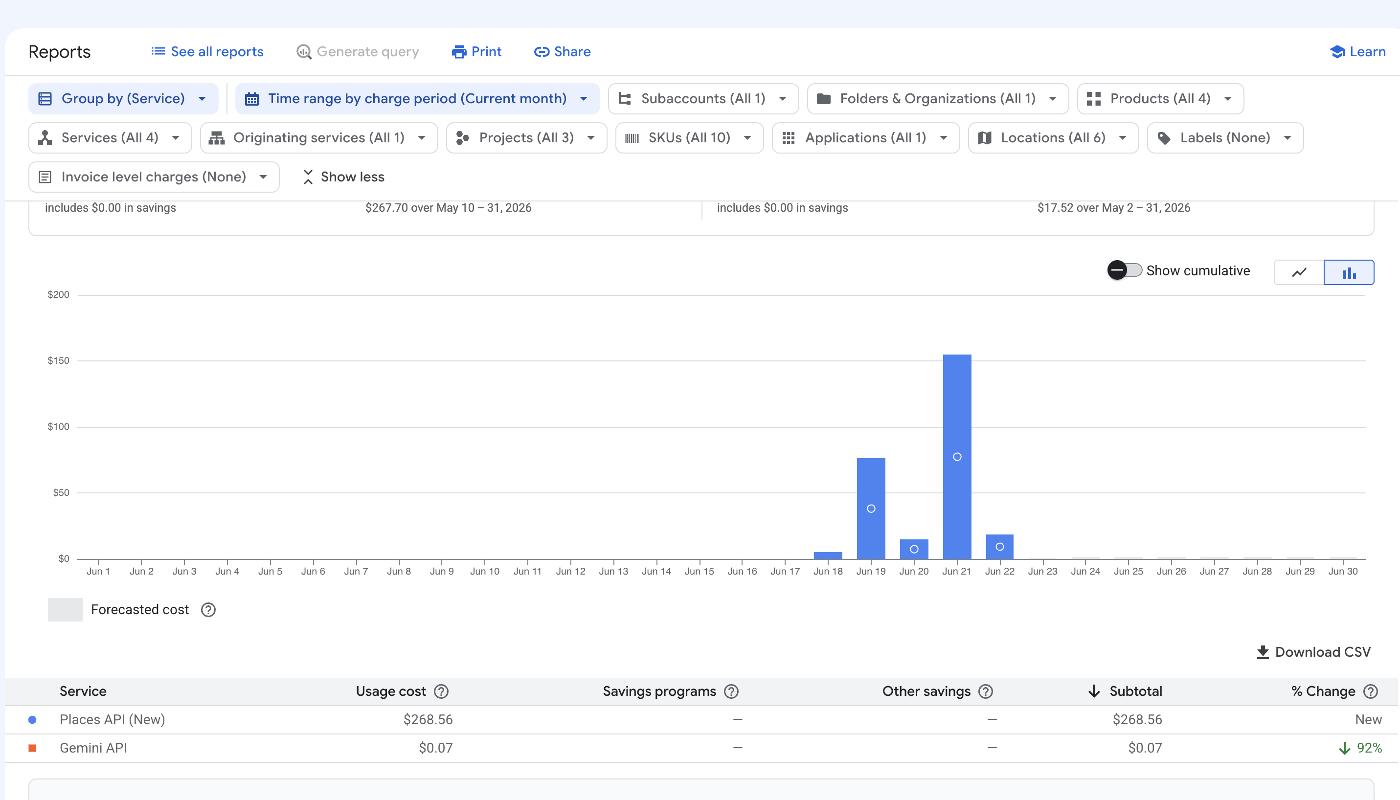
The problem was invisible in the code — and by the time anyone noticed, the billing dashboard told a devastating story. That API charged a small fee every single time it fetched the data. And the integration re-fetched constantly — on every page load and every browser refresh — pulling the exact same rarely-changing information over and over. Business hours don't change hourly. A star rating doesn't shift by the minute. But the API didn't know that, and nothing told it to stop asking.
Those small charges compounded silently into thousands of dollars before anyone caught it. Because most usage-based APIs are postpaid, no automatic shutoff triggered and no hard limit stopped the charges. Billing dashboards on major API platforms update hours after the calls occur, which means a runaway integration can accumulate significant costs before an owner ever sees a warning — and by the time an alert email arrives, the damage is already done.
Runaway API costs like this aren't a freak accident — they're a predictable outcome when an integration is built without specific protective guardrails. Think of it this way: the feature works exactly as coded. It just wasn't coded with your billing account in mind. Any small business website displaying live data — reviews, hours, ratings, inventory — faces the same structural exposure if those protections aren't built in.
Why This Happens to Small Business Websites More Often Than You Think
The visible output and the billing efficiency of an API integration are completely independent of each other. A feature can display reviews perfectly, update ratings on cue, and refresh hours automatically — while silently executing far more paid API calls than it ever needed to. It takes deliberate engineering discipline to address both sides of that equation, and not every developer has been held accountable for what a feature costs at scale.
The most dangerous misconception is about budgets. A common question is whether setting a spending limit inside Google Cloud Console or a similar platform will stop charges once the limit is hit. The honest answer is no — it won't. Most usage-based APIs, including Google's Maps and Places APIs, are postpaid: you consume first, you are billed after. A "budget" in these platforms sends an email alert when you approach a threshold. It does not cut off API calls. The meter keeps running regardless of what your budget settings say.
What makes this worse is a billing lag that catches most owners off guard: major API platforms update their usage dashboards hours after the calls occur. By the time an alert email arrives and an owner logs in to investigate, a large number of billable requests may have already executed. The business owners most at risk hired someone skilled at building the visible feature — but who had never been responsible for what that feature cost at scale.
The Three Protections Every Experienced Developer Builds In Before Launch
Protecting against runaway API costs requires three specific safeguards, all built into the integration before a single visitor ever loads the page.
Start with caching. Rather than calling the API on every page load, a well-built integration saves the response the first time and serves that stored copy to every subsequent visitor. The API gets called once per cache cycle instead of once per page view — and that single architectural decision can reduce billable calls by orders of magnitude. Caching pairs naturally with a refresh window (also called a TTL, or Time-To-Live), which defines how long that saved data stays fresh before the system fetches an update. Business hours, a street address, or a star rating might change once a week at most, so a daily or weekly TTL is entirely appropriate. Rounding out the system is a hard rate limit coded directly into the integration — unlike a billing alert, this actually stops API calls when a ceiling is hit, regardless of traffic volume, crawl bots, or unexpected bugs.
These three safeguards work together: caching minimizes calls, the TTL prevents over-refreshing, and the rate limit acts as a final backstop. An integration missing any one of these layers leaves your billing account exposed.
Types of Website Features That Carry Hidden API Cost Risk
Recognizing which features on your own site carry this exposure is the first step toward protecting yourself. This risk appears across several common website features that small businesses add regularly.
- Google Maps and Places API features: Displaying a business location map, pulling live star ratings and reviews, or showing a real-time "open now" status all use paid Google APIs that charge per request and are postpaid by default. These integrations are particularly prone to runaway costs when caching is absent.
- Review aggregation widgets: Third-party widgets that pull live reviews from Google or Yelp charge per fetch. Widgets configured to refresh on every page load — rather than on a timed interval — are especially prone to billing runaway.
- Live inventory and pricing feeds: E-commerce and service sites pulling real-time product availability, appointment slots, or dynamic pricing from external APIs face the same structural risk. A single high-traffic day or an automated crawler can generate massive unexpected call volumes.
- AI chatbot integrations: Large-language-model APIs charge per token or per request. A bot-traffic spike on a popular page can generate significant costs within hours when no call ceiling is enforced.
- Weather, shipping, and third-party data widgets: Any widget pulling live external data — shipping estimates, currency conversion, or event calendars — on every page load rather than on a timed refresh carries the same structural cost risk as the integrations above.
If your site uses any of these features and you are not certain all three protective layers are in place, your billing account may already be exposed. Contact our team at +1 (818) 912-9721 before your next traffic spike makes the problem visible.
How to Audit Your Existing Website for Runaway API Exposure
Walking through four concrete checks can reveal whether your site carries this exposure, without touching a single line of code.
Step one — List every live-data feature on every page. Anything displaying maps, reviews, star ratings, chat widgets, live inventory, or real-time pricing is a potential API call source. Write them down. Each feature on that list demands a clear answer to the questions that follow.
Step two — Ask your developer three specific questions in writing: Is this integration cached? How often does it re-fetch data? Is there a hard rate limit that stops calls if something goes wrong? If your developer cannot answer all three confidently, those protections likely don't exist.
Step three — Check your API billing dashboards today. Log in to Google Cloud Console or any third-party provider's usage section. Pull the call volume trend for the past 30 days. A properly cached integration produces a flat, low call count rather than a curve that rises and falls with your page view traffic. A call volume graph that mirrors your traffic pattern suggests the integration is fetching on every page load.
Step four — Verify what your budget alerts actually do. On most major platforms, budget alerts are email notifications only — they do not stop charges. If a budget alert is your only protection, your account has no real ceiling. That distinction is critical, and many business owners don't discover it until the bill arrives.
What Postpaid API Billing Actually Means for Your Business Budget
Most subscription services you pay for as a business owner are prepaid: you pay a flat monthly fee upfront, and if you don't renew, the service simply stops. Usage-based APIs work in the exact opposite direction. You consume the service first — every API call happens in real time — and the platform tallies the total afterward and bills you for precisely what was used. There is no automatic shutoff when spending climbs unexpectedly.
A common question is whether setting a "budget" inside a platform like Google Cloud will create a hard spending ceiling. The honest answer is no. Budget alerts are email notifications, not enforcement mechanisms. When your spending crosses a threshold, Google sends an email — and the API calls continue without interruption on the other side of that email. No confirmation is required. No integration is paused.
The practical implication for a small business owner is significant. A live review widget that charges per fetch feels harmless in isolation. Multiply that cost across a high volume of daily page loads over several weeks, and the cumulative exposure can reach thousands of dollars — disproportionately large relative to the value of displaying a star rating that rarely changes. Understanding this model before you add any live-data feature is the single most important financial protection you have.
How LeadsBabyLeads Builds These Protections In Before Anything Goes Live
LeadsBabyLeads was founded by Daniel Shervin Rabizadeh, a UCLA Computer Science and Engineering graduate who spent over eight years as a Senior Software Engineer at Teradata building enterprise-scale data and analytics platforms. That background shapes how every integration gets built: cost controls, fallback logic, and failure-mode planning are standard engineering practice, not afterthoughts requested by clients.
Every live-data feature the team builds ships with caching, a refresh window calibrated to how frequently the underlying data actually changes, and a hard rate limit coded into the integration itself. These are not premium add-ons — they are baseline requirements that any engineer who has worked at enterprise scale knows to treat as non-negotiable.
That discipline is reflected in a track record of over 100 websites delivered across Southern California — including Auto Body of Los Angeles, Kosher Sushimon, Jewish Invite, Beit Avraham, Bet Medrash Mevaser Tov, and IJ Rescue — spanning high-traffic service businesses, digital platforms, catering operations, and community organizations, each with distinct data-feature requirements handled safely.
The team builds on a static site architecture that scores 95+ on Google Lighthouse and carries a 99.9% uptime guarantee. Because pages are served as pre-built static files by default, external API calls are structurally minimized before any additional caching layer is even applied — a technical foundation that inherently reduces billing exposure from the start.
The Real Cost of 'It Looks Like It's Working' Website Development
A feature that displays your Google reviews correctly on screen tells you nothing about what is happening in the billing account underneath it. Visual output and billing efficiency are completely independent of each other — a page can render beautifully while silently executing unnecessary paid API calls with every visitor.
The business owner described earlier had a feature that worked perfectly from a user's perspective. Visitors saw the star rating, the hours, the reviews. Nothing looked broken. The problem lived entirely in the architecture beneath the surface — specifically in the absence of caching and any hard rate limit. A passing visitor, a site crawler, or a curious customer refreshing the page all triggered fresh billable requests for data that hadn't changed.
When evaluating any developer adding a paid integration to your site, three questions cut straight to the issue: How is this data cached? How often will it actually call the API? What happens if a bot or traffic spike hits this page? A developer who hesitates on any of those questions has likely left the financial protections unbuilt.
The hidden cost of inexperienced web development is not always a site that looks bad. It can be a technically functional site that generates real financial exposure for weeks before anyone notices — and by then, the damage is already on the invoice.
Services LeadsBabyLeads Offers for Safe, High-Performance Website Development
LeadsBabyLeads builds websites on a static architecture using Astro, which means pages are pre-rendered and served as static files — structurally eliminating the pattern of live API calls firing on every page load before any additional safeguard is even configured. That architectural choice is itself a cost-control decision, not just a performance one.
When a business needs AI Implementation — chatbots, automated lead capture, intelligent scheduling, or workflow automation — the team engineers rate limiting and caching into every usage-based integration from the start. The same discipline applied to Google review widgets applies equally to large-language-model API calls and third-party automation tools.
For SEO, AEO, and Google Business Profile Optimization, surfacing accurate hours, addresses, and reviews in search results and AI engines like Google AI Overviews, ChatGPT, and Perplexity does not require a live API pull on every visitor request. The team achieves rich, current business data presentation through Schema.org structured data and GBP synchronization — methods that are both cost-safe and more search-engine-friendly than live API fetches.
Core Web Vitals Optimization and billing efficiency are directly connected: a page not making redundant external calls loads faster, scores higher on Lighthouse, and ranks more competitively in organic search. Each service the team delivers is designed so these outcomes reinforce each other rather than compete.
Talk to LeadsBabyLeads Before You Add Live Data to Your Site
The right time to ask about cost controls is before a live-data feature goes live — not after the first billing cycle reveals the damage. Whether you are considering a Google rating display, a map embed, an AI chat widget, a review feed, or any integration that reaches outside your website to pull external data, a brief conversation upfront costs nothing and can prevent thousands of dollars in unexpected charges.
LeadsBabyLeads serves small businesses across Los Angeles and Southern California and is available to review an existing integration for billing exposure, evaluate a feature you are planning to add, or build an entirely new website with caching, refresh windows, and hard rate limits engineered in from the first line of code. Every protection described in this article ships as a default — not an upgrade.
Reaching the team is straightforward: call +1 (818) 912-9721 or contact us through the website. Open Monday through Thursday from 9 AM to 11 PM, Friday from 9 AM to 1 PM, closed on Sunday and Saturday.
Small businesses deserve professional, data-rich website features without the hidden financial risk that comes from integrations built without the right safeguards. That is precisely what our team builds — and what businesses throughout Los Angeles and greater Southern California have come to expect from working with us.
Frequently Asked Questions
13 questions answered
How much can hidden API costs actually cost a small business website?
Hidden API costs can quietly reach thousands of dollars before a business owner even realizes there is a problem. Because usage-based APIs charge fractions of a cent per call, the billing feels invisible day-to-day — but a poorly built integration making thousands of redundant requests can compound those micro-charges into a serious financial hit within days or weeks.
Does setting a budget alert on Google Cloud Console stop API charges from exceeding that amount?
No — a budget alert on Google Cloud Console or similar platforms sends you an email notification when you approach a threshold, but it does not cut off API calls or stop charges. Google's Maps and Places APIs are postpaid, meaning you are billed for consumption after the fact, and the meter keeps running regardless of what your budget settings say. Only a hard rate limit coded directly into the integration will actually stop calls from executing.
What is API caching and why does it prevent runaway billing?
API caching means saving the response from an API call the first time it runs and serving that stored copy to every subsequent visitor instead of making a new paid request. Because data like business hours, an address, or a star rating rarely changes, there is no functional reason to re-fetch it on every page load. A properly cached integration can reduce billable API calls by orders of magnitude compared to an uncached one.
What is a TTL and how does it protect against unnecessary API calls?
TTL stands for Time-To-Live, and it defines how long a cached response is treated as fresh before the system fetches a new one. For data that changes infrequently — like a business address, phone number, or star rating — a daily or weekly TTL is entirely appropriate. Setting a short TTL or no TTL at all forces the integration to re-fetch data far more often than the data actually changes, which drives up API costs without any benefit to the visitor.
What is a hard rate limit and how is it different from a billing alert?
A hard rate limit is a ceiling coded directly into the integration that physically stops API calls from executing once a defined maximum is reached, regardless of traffic volume or bugs. A billing alert, by contrast, only sends a notification — it has no ability to halt requests. The hard rate limit is the final backstop that catches scenarios caching and TTL settings alone cannot prevent, such as a bot traffic spike or an unexpected code loop.
How quickly can a runaway API integration cause damage before an owner notices?
Major API billing dashboards update usage data hours after the calls occur, not in real time. By the time an alert email arrives and an owner logs into the dashboard to investigate, a significant volume of billable requests may have already executed. This lag means a runaway integration can bleed money through an entire business day — or longer — before intervention is even possible.
Are AI chatbot integrations on small business websites also at risk for surprise billing?
Yes — large-language-model APIs that power AI chatbots typically charge per token or per request, and they carry the same postpaid billing structure as other usage-based APIs. A bot-traffic spike on a high-visibility page, or a chatbot configured without a call ceiling, can generate significant costs within hours. The same three protections — caching where applicable, rate limiting, and hard call caps — apply to chatbot integrations just as they do to data APIs.
Is it worth hiring an experienced developer specifically for API integrations, or can any web developer handle it?
A developer skilled at making a feature look and function correctly can still leave your billing account exposed if they have never been responsible for what an integration costs at scale. The visible feature — reviews displaying, hours updating, a chatbot responding — can work perfectly while the underlying API quietly accumulates thousands of dollars in charges. Experience with cost controls, not just feature delivery, is the relevant qualification when adding any paid integration to a small business site.
What is the difference between a postpaid API and a prepaid API?
A postpaid API bills you after you have already consumed the service — you use it first, and the charges are calculated and invoiced after the fact, often with a multi-hour reporting lag. A prepaid API requires you to load credits in advance, and calls stop when the balance is depleted. Most major developer APIs, including Google's Maps and Places APIs, operate on a postpaid model, which is why budget alerts exist only as notifications rather than hard stops.
How does LeadsBabyLeads approach API integrations to protect clients from surprise bills?
LeadsBabyLeads builds caching, a defined refresh window, and a hard rate limit into every paid API integration before anything goes live — these are default requirements, not optional add-ons. The team brings extensive development experience, including enterprise-scale software engineering background, to every integration decision. That means clients get data-rich, professional website features without the billing exposure that comes from integrations built without cost controls.
Can automated crawlers and bots trigger hidden API costs on a small business website?
Yes — search engine crawlers, monitoring bots, and malicious scrapers can all trigger page loads, and if an API call fires on every page load without caching or rate limiting, each bot visit generates a billable request just like a human visitor would. A high-crawl period or a sudden bot traffic spike can therefore generate unexpected API charges that have nothing to do with genuine customer activity. A hard rate limit stops this regardless of the source of the traffic.
What should I ask before letting a developer add live reviews or a Google Maps feature to my website?
Ask specifically whether the integration uses caching, what the TTL or refresh interval is set to, and whether a hard rate limit is coded into the implementation — not just a billing alert configured in the API provider's dashboard. If the developer cannot answer all three questions clearly, the integration is likely built without the cost controls that prevent runaway billing. Getting these answers before launch is far less painful than auditing a billing dashboard after thousands of dollars have already been charged.
Does LeadsBabyLeads work with small businesses outside of Los Angeles?
While the majority of LeadsBabyLeads clients are based in Los Angeles, the client base spans Los Angeles and greater Southern California. Services include website development, SEO, AEO, and API integrations built with the cost controls and performance architecture that protect businesses from the kind of billing exposure described in this article.